Within the mechanical keyboard community, there's a hierarchy of switches ranked in terms of generally understood quality or respectability, and near or at the top of this list is almost always the famed IBM Buckling spring styled switch. In this area, keyboard enthusiasts are put in an unfortunate position, as buckling spring switches are also some of the rarest switches to exist on modern in-production keyboards, with only 2 that I'm familiar with that are still producing buckling spring keyboards. Of those 2, the focus of this review will be those developed by Unicomp, as demonstrated through their Mini M keyboard. Before I get into the review itself, however, its important to understand the history of unicomp, and how it is that they are one of the few remaining contemporary producers of the famed buckling spring. After the history, I will go over the function of the switch, its sound and feel, and finally review the Mini M itself as it compares to not only old buckling spring keyboards as those from IBM themselves, as well as some other keyboards that you may be familiar with. Ultimately, its important to note that the unicomp mini m is a fantastic keyboard that has some pretty clear flaws, and some areas worth considering for those who have not used a buckling spring keyboard in the past.
Unicomp as a company was founded in 1996 by Ex-IBM and lexmark employees (the companies previously responsible for the Model M) following Lexmark leaving the computer peripherals business entirely, and IBM switching to cheaper membrane under rubber dome keyboards over their classic model Ms. This left a gap in the market for the old school model Ms, which unicomp filled primarily for industrial and business purposes for the remainder of the 90s and into the 2000s, before switching to a primarily consumer facing company by the late 2010s, which is where much of their renown within the mechanical keyboard community comes from. The way that unicomp managed to continue producing model Ms was through their use of the tooling which was used to create the late, lexmark-branded model Ms, thus allowing for production to effectively continue, but at a reduced capacity. This is unfortunate, as the late lexmark model Ms are notoriously lower quality as compared to the original IBM branded model Ms, although when comparing even the lexmark keyboards to many modern plastic membranes and even some plastic mechanicals, they are still built remarkably well. This lower quality plastic and tooling has improved overtime as unicomp has further modifeid and developed their keyboards, but they aren't to the level of the original model Ms.
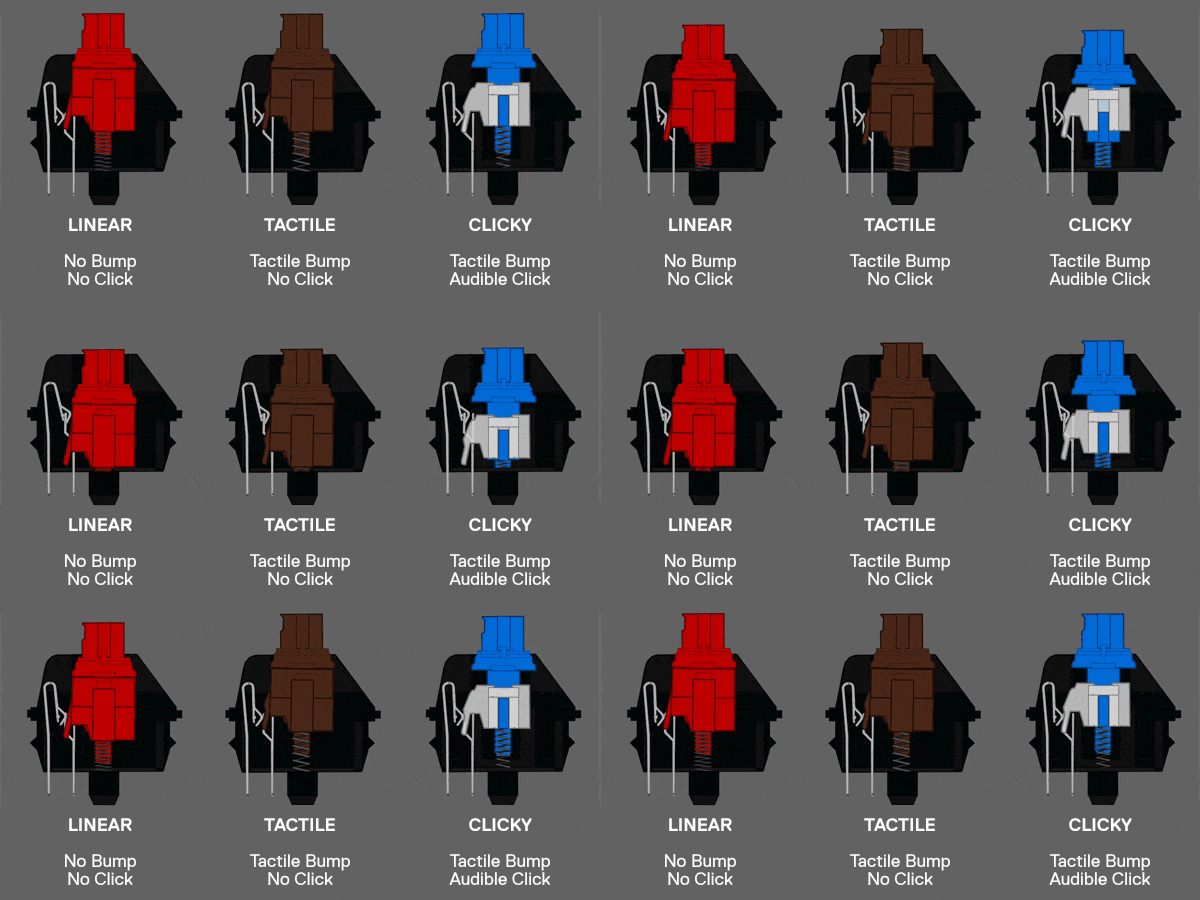
The way that most common mechanical switches today operate is through the Cherry MX-style mechanism. This mechanism involves, depending on the type, a plastic stem which is attached to a spring. When the key is depressed, the plastic stem pressed down on the spring, and intercepts an electrical contact which closes a circuit, thus signalling a keypress. This can be modified with the inclusion of a plastic "bump" on the switch intended to add resistance, and thus tactility, to the keypress, as seen in the controversial MX-Browns. They may also include a click lever, which is a piece of metal which produces a click sound when smacking against itself as the stem moves past it, as seen on MX-Blues. This mechanism is fine, and works well enough to create a relatively flexable switch which can form a variety of roles, namely linear (smooth travel without a tactile bump), tactile (with a tactile bump), or clicky (with a tactile bump connected to a clicker), which makes them fantastic for custom keyboards where the user may want to switch what type of switch they prefer at any given time through either a hot-swappable PCB, or soldering the PCB directly. Where this board is lacking is in truly excelling at any of those 3 categories. This is due to the mechanical limitations of the structure of the switch itself. Take linear switches, for instance, which at least today are the most popular switch type online. On a MX-style switch, a plastic stem is necessarily making contact with a plastic housing while it slides up and down the switch mechanism. This produces friction, which in the context of a mechanical switch, produces a scratchiness which is not generally desirable in a switch meant to be smooth. This is generally remedied by applying lube to the switch to reduce the friction of the switch, but this is not a great solution as the lube also reduces the sound, and tactility of the switch, which also not a major problem for linears, is for tactile and clicky switches. Here, generally you want more tactility, and a better click sound, which lube can potentially disrupt, thus leading to a balancing act of the delta of smoothness and tactility which is difficult to maintain. Although some switches perform better at this than others, it is mechanically challenging to have a "sharp" tactility or click while avoiding scratchiness, as the act of lubing the switch also rounds out the tactility. This can be desirable, as seen in my beloved Topre switches, which are about as round of tactility as you can get, but can often be undesirable in MX style switches as the roundness is necessarily disrupted by some "steppiness" as derived from the fact that it isn't contactless (as magnetic switches like Hall Effect switches are). Thus, MX switches are fantastic for their flexibility and customizability, but operate as a sort of "jack of all trades" switch, rather than truly excelling at any single function. This is where the less popular switch types may carry the torch, and of those, the most well renowned arguably is the buckling spring.
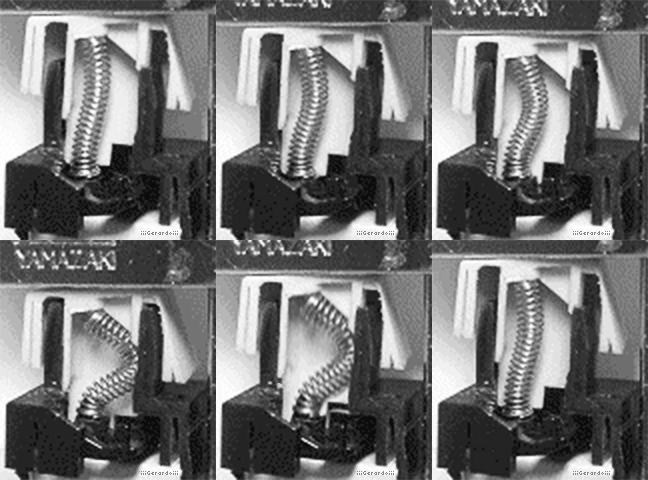
The way that IBM's buckling spring switch functions is around a spring which is stuck between an electrical contact pad (a membrane in the "M" type keyboards, such as IBM's model M or the unicomp, and a capacitive PCB in the case of "F" type keyboards), and a keycap. When the keycap is depressed, strain is placed onthe spring (which is made to be longer than the space it is held within), causing the spring to buckle out from under itself, forming a loud and sharply tactile "click", while simultaneously actuating a flipper which makes contact with a membrane or PCB, thus registering a keypress. What this forms in practice is about as sharp of a tactile bump as can be achieved mechanically which is tied 1:1 with the audible click, this creating a level of tactility that is impossible to replicate with MX style switches. Indeed, MX style switches, due to their mechanical limitations, cannot achieve the sharpness of tactility that a buckling spring switch can, making the tactility somewhat unique in modern keyboards. Thus, if the typist in question desires tactility and enjoys the sound of a good clicky keyboard, you really can't do better than buckling spring switches as far as modern keyboards are concerned (although there are alternatives such as beamspring keyboards, but that is beyond the scope and budget of this review).
Its unfortunate, then, that where MX style switches are so flooded for choice that one is liable to be overwhelmed, buckling spring enjoyers effectively have two choices when deciding on a keyboard, the modern model Ms produced by unicomp, and the considerably more expensive model F keyboards as produced by Joe from "modelfkeyboard.com", which for me, effectively reduces my options to unicomp. Sure, I could use an old model M or F purchased from a swap meet or eBay, but these are often far more expensive, require dongles to connect to modern devices, and commonly require additional maintanence because of their age. Besides, for many keyboard enthusiasts, getting something new rather than used is important, and in this area, options are reduced to 2. Not that these are bad options! I love my mini M, as will be clear through this review, and although I haven't had the chance to try Joe's model Fs, I've heard good things! But still, it is unfortunate for people who desire truly sharp tactility, there are few options available for them. Below is a gif of a buckling spring switch that I got from Reddit, which sourced it from overclock.net, as well as a gif of some Cherry MX switches I got from Jeff Abbot on penaddict.com for demonstration purposes.
TL;DR the unicomp model M is a great board which suffers from some build quality concerns and reduced sound quality as compared to the proper IBM model Ms, but is ultimately well worth the relatively inexpensive cost, particularly as compared to its contemporary Joe's model F and the cost of buying used old model Ms.
Getting the best and worst aspect of this board out of the way, the unicomp mini M is built like a tank in some respects, but is lacking in others. Like most model Ms, the keyboard is exceptionally solid and heavy, and feels like a serious piece of equipment. However, unlike the model Ms of the 1980s, Unicomp's model M uses thinner, cheaper plastic, and flexes quite a bit more. Moreover, the switches themselves have a higher pitched click as compared to the originals, which makes them feel slightly cheaper in comparison (although still considerably better than any other clicky switch I've tried within the MX-line up). Thus, although the keyboard feels higher quality than most plastic keyboards, it is still a plastic keyboard, and made of materials that just don't compare to the OGs. If you've never tried an original model M, you won't know what you're missing and you'll probably think of the mini M as an absolute beast, but as someone who is familiar with the originals, I do wish that it was built with the old tooling rather than the later lexmark tooling. I understand why it was built that way considering the history of unicomp, and I am just happy to have such a good board at all, but I wish it was a little better. The keycaps are the one area that I think are just as good as the originals, with razor sharp lettering on dye-sublimated PBTs, and a really attractive color scheme of white and gray on a black chassis, which looks super sleek. Aesthetically in general the keyboard is one of the best in my collection, and I think it looks better than 90% of newly released prebuilt keyboards. Thus, I love the aesthetics, and the build quality is fantastic when compared to plastic keyboards of today, so this still gets a good review from me, even if it could be better.
The layout of the board is based on the IBM SSK Model M, or the "Space Saver Keyboard", which is a TKL, or ten-keyless, which is 80% of a full keyboard. This is layout is on the larger side, as is the keyboard itself, when taken into a modern context, but at the time of the SSK's creation, it was a serious reduction in size compared to most other model Ms. I think this is a really great sweetspot for a board like it, as it feels beefy, and takes up a decent bit of space, but isn't so big that it covers your entire desk. Besides that, its a fairly typical QWERTY layout, modified from the OG design with the inclusion of super or windows keys, which is a welcome inclusion, since I use the super key all the time with GNOME for quickly searching for and launching applications or finding files. Thus, the layout works decently well for me, although I do still prefer the HHKB for its substantially more compact size, and the way it handles function layers, among many other reasons why I love the HHKB. One minor area that I don't care for is the placement of the super key, which I prefer to live where the alt key usually is placed, and is placed on this board, as it allows me to move my thumb over a very small distance with minimal strain to hit a key that I press constantly in my workflow, while with the typical windows-based QWERTY layout, the super key is just far enough away that it strains my thumb to press it, as I need to move it under my hand to reach the super key. Its not the end of the world, and in practice I generally just remap the alt as super, but it is something that annoys me about this board, particularly since the alt and super keys are different sizes, so I can't just swap them over for the visual cohesion with my remapping. For most people, however, this is an incredibly standard QWERTY layout, and you shouldn't have any issues adjusting to it.
The aforementioned buckling springs feel fantastic in this board, with a level of sharpness in tactility that you can't really get in any other switch type. It is substantially heavier than most switches, at closer to 70 grams of force required to actuate the switch, as compared to the more typical 40 grams of most MX style switches, or the 45 grams of my beloved HHKB topres. This leads to a switch which feels very heavy, where the start of the press involves quite a bit of pressure, followed but a sudden, explosive tactile click, and then a little bit of extra actuation at the bottoming out. This crisp, but heavy tactility can be fatiguing, and indeed for me it was exactly that, with tasks that require a lot of constant pressue like gaming being borderline unusable for me, since my fingers would just get too tired. Writing and programming were better suited for this type of switch for me, but even here the weighting was fatiguing after a while. That being said, it never stopped being enjoyable to type on, even as my fingers became fatigued. Generally in my couple of weeks of using it as my primary keyboard, I would just switch to my HHKB if my fingers became too tired, and after they recovered, I'd switch back to the unicomp. I am fortunate that I have enough boards with a variety of switch weightings such that I can do that, but if this was your only keyboard, it would take some serious getting used to with regard to the weight of the switches themselves. All of that said, I cannot express enough just how crisp the switches feel, you really get the sensation of a substantial clink of machinery as you press on the switch, in a way that is only really rivaled by beamsprings or an old school typewriter. And although recently clicky switches have fallen out of fashion, I truly think that it is because of how poor most MX style clicky switches are, as a more refined click as seen in the buckling spring is a joy to listen to and feel. Below are the force curves of buckling springs, Cherry MX-Blues, and cherry MX-Browns for comparison
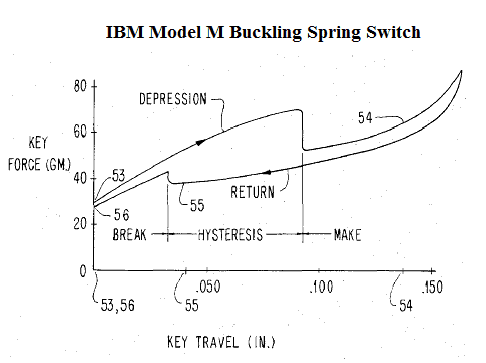
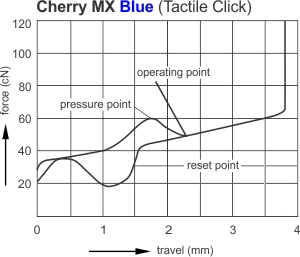
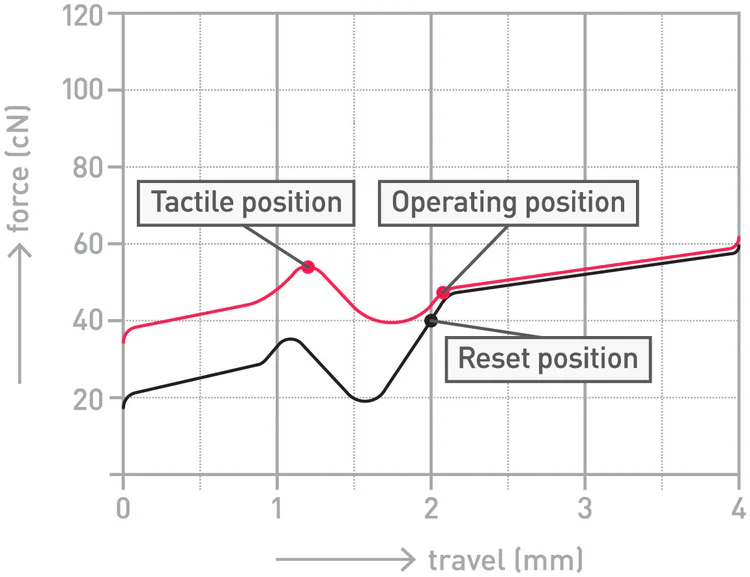
In this area, the unicomp is one of my favorite boards. The relatively hollow plastic chassis allows the sound to be amplified similarly to an acousting guitar, thus the wonderfully satisfying, and reverberating click is exceptionally loud, and pleasant to listen to, at least for me. There is a bit more rattle than is presenton the OG model Ms and Fs, but nothing too bad, and in the end it sounds leagues better than any other modern clicky switch that I know of. Recently, for the sake of comparison, I tried out gateron blue pros as a standard, "high quality" clicky switch that might appear in a prebuilt you could find on retailers like amazon, and it is just awful in comparison. The click on the gaterons were so high pitched and flat, like clicking a cheap ballpoint pen, as opposed to the explosive sound and feel of the buckling springs. Sure, if you want a quiet switch, you definitely should stay away from this keyboard, but good lord it sounds and feels amazing. Not quite as good as the OG model M, but damn close.
Now here's a typing demo of the mini M, as well as my custom Keychron Q2 with super banana switches and the HHKB for comparison. I would compare another clicky switch, but I don't have one on hand since the gateron blues are loose in a bag at the moment and I don't have the time to put them into another board for comparison unfortunately. In the future when I do have time, I'll add the gateron blues for comparison as well.
The Unicomp mini M is a fantastic keyboard, and at only 179 dollars, it is quite honestly a fantastic price for a keyboard of its caliber. You just cannot get a better clicky switch anywhere near this price range if you're shopping for a newly produced keyboard, and for that reason, it gets my glowing recommendation. Although as I've said before, I've heard good things about Joe's model Fs, they are considerably more expensive, making them less desirable in comparison. I would love to get one of Joe's model Fs, but at this point they are severely cost prohibitive, with a comparable board to the mini M costing closer to 300 or 400 dollars after shipping and such. Thus, the mini M serves as a fantastic way of experiencing buckling spring switches on a new board, all while being well built, and pretty to look at. If you have the money and inclination, you should buy the board at least to try it out, as it may just become your favorite! Although It is too fatiguing for me personally, it is a ton of fun to mess around with once in a while.