For those who have been following my site for a while, you will know of my interest in Keyboards, and my love of the Happy Hacking Keyboard, or HHKB, and its most commonly used switch type, Topre. For those that don't, this review covers my past experience with keyboards to the point of its writing, and briefly explained why I liked topre switches as much as I do. So, it may come to a surprise that I have tried a number of keyboards and switches since I wrote that, and in doing so, I have felt that most of them were too far from my personal taste to bother writing about, but this changed with the Keychron R3 Retro paired with their own super banana tactiles. In the week or so I've been testing the keyboard as my daily driver, I've been thoroughly impressed, and could comfortably switch to it as my forever board if not for a couple quirks which have me returning to the HHKB. All told, if you are interested in mechanical keyboards, and have a preference for tactility, as well as deep, "thocky" sound, this keyboard may satisfy you, although I still ultimately recommend the HHKB.
A minor step up compared to the HHKB, the build quality of the R3 is impressive, with a thick, plastic chasis that gives the keyboard some decent weight. Although nothing like the metal chasis of some more expensive boards, or as tanky as the venerable IBM model F and Ms, it is better than the lighter, slightly cheaper feel of the HHKB. That being said, the keyboard is packed with dampining foam, which reduces the volume of the sound the switches can make, which for many is a good thing, but is different compared to the HHKB, which has a largely hollow chasis which reverberates the sound, making it much deeper, even if the bananas might have had the potential to be as deep in sound as the topre switches (although I don't know for sure because I don't want to modify the keychron, nor switch the switches to a chasis that I have already modified because its fine enough as is, and might actively make it worse as is often the case with MX style switches and amplified sound). That being said, I'm very happy with how quality the plastics feel, with a real premium slightly rough texture all throughout. This carries over to the keycaps, which are double shot PBT plastic, with some truly razor sharp lettering, and a nice texture which makes typing for long periods of time a treat. I would put them on par with the PBT keycaps on the HHKB professional classic.
The R3 looks gorgeous as far as I'm concerned, indeed the appearance is one of the big reasons I went with it and not another keyboard that Keycrhon released with the super bananas. Its a 75% layout, with a "retro" look (meaning it emulates the kind of off-white, beige color of late 80s, early 90s computing as seen on keyboards like the model Ms. This is the same look that the HHKB has by default, and is common in older keyboards, and a look that I vastly prefer to the modern look of most keyboards I've seen. Although I don't use it, the keyboard does have RGB backlighting, but if I'm honest I always considered the RGB to be an eyesore, so I always leave it off. All told, it looks miles better than 90% of the keyboards I see for sale and in forums.
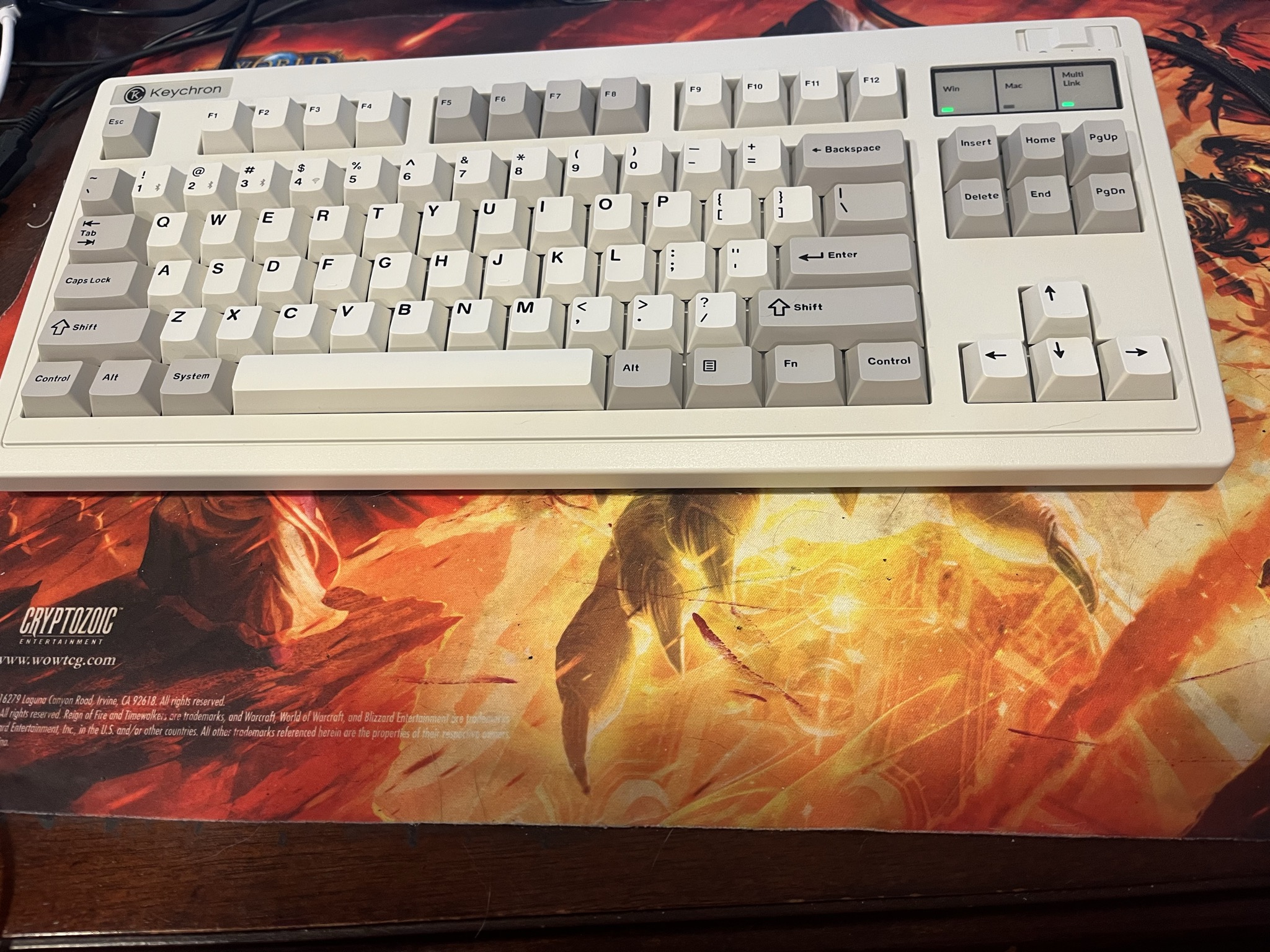
I mentioned it briefly, but the keyboard is a relatively basic 75% QWERTY layout, which is fine, but I'm not a huge fan, and I very quickly remapped quite a few keys to match the comforts I have gotten used to with the HHKB layout. The first and most essential change I made was swapping the caps lock key with control, and if you reading this have not tried this, I highly encourage you to give it a shot. I rarely if ever need to use capslock, and use control constantly in my work and play, and having that key so close to where my fingers naturally rest on the homerow so I can just tap it with my pinky without moving my hand at all is just so comfortable. By default, this is not the layout that the R3 has (as expected of a typical QWERTY), but the keychron launcher browser tool makes remapping incredibly simple, so its not a huge deal. There are larger issues, though, which make me still ultimately prefer the HHKBs 60% layout, namely the position of the escape key, and the backspace key (both of which can be remapped, but I only really bother to remap the backspace because I also use the tilde key relatively frequently). On the HHKB layout, the escape key is just above the Tab key, which makes pressing it incredibly easy and quick, without needing to move my hand in a different position, while on a typical QWERTY layout, I need to reach my hand up and over onto the function row, which is annoying and fatiguing over time when typing for long stretches. Similarly, I prefer the placement of the arrow keys on the HHKB, which are hidden under a function layer in a place that feels natural for my hands (which bear in mind are fairly small). This means I barely have to move my hand to use the arrow keys, just press the Fn key located just under the enter/return key and next to the right shift, and then use the arrow keys that are set vertically right next to the return key. On the keychron, there is a dedicated, upsidedown T arrow cluster as is normal for any layout that is greater than or equal to 65%. This is good, and actually in some ways better than the arrows hidden under a function layer, as it allows you to use the arrow keys without the constant pressing of a function key. This works much better for games that require the constant use of the arrow keys, but for me is slightly worse for most other tasks, as I have to move my hand away from the homerow to the bottom right in order to press the arrows, which slows me down, and adds more fatigue. That being said, its still fine, and I don't feel like I'm missing too much by not having the convenient Fn layer for arrow keys. So in sum, if you are used to a typical QWERTY layout, the R3 will be perfect, but for me I would prefer if it were an HHKB layout personally.
The R3 that I bought came with Keychron's own Super Banana Switches, which are a tactile switch with an actuation force of 57 grams, which is quite a bit heavier than the HHKBs 45 gram actuation of the HHKB Topres, and significantly more than a typical linear switch. What this means is that there is a considerable tactile bump when actuating the switch which is the best I've felt on an MX style switch, and similar to the level of tactility seen in the Topres. Where they differ is their force curve, although not so much that they are dramatically different as it more common of Topre and MX switches, which you can see in the following force curves (topre curve credit goes to unrealkeyboards, and the R3 force curve comes from Keychron themselves):
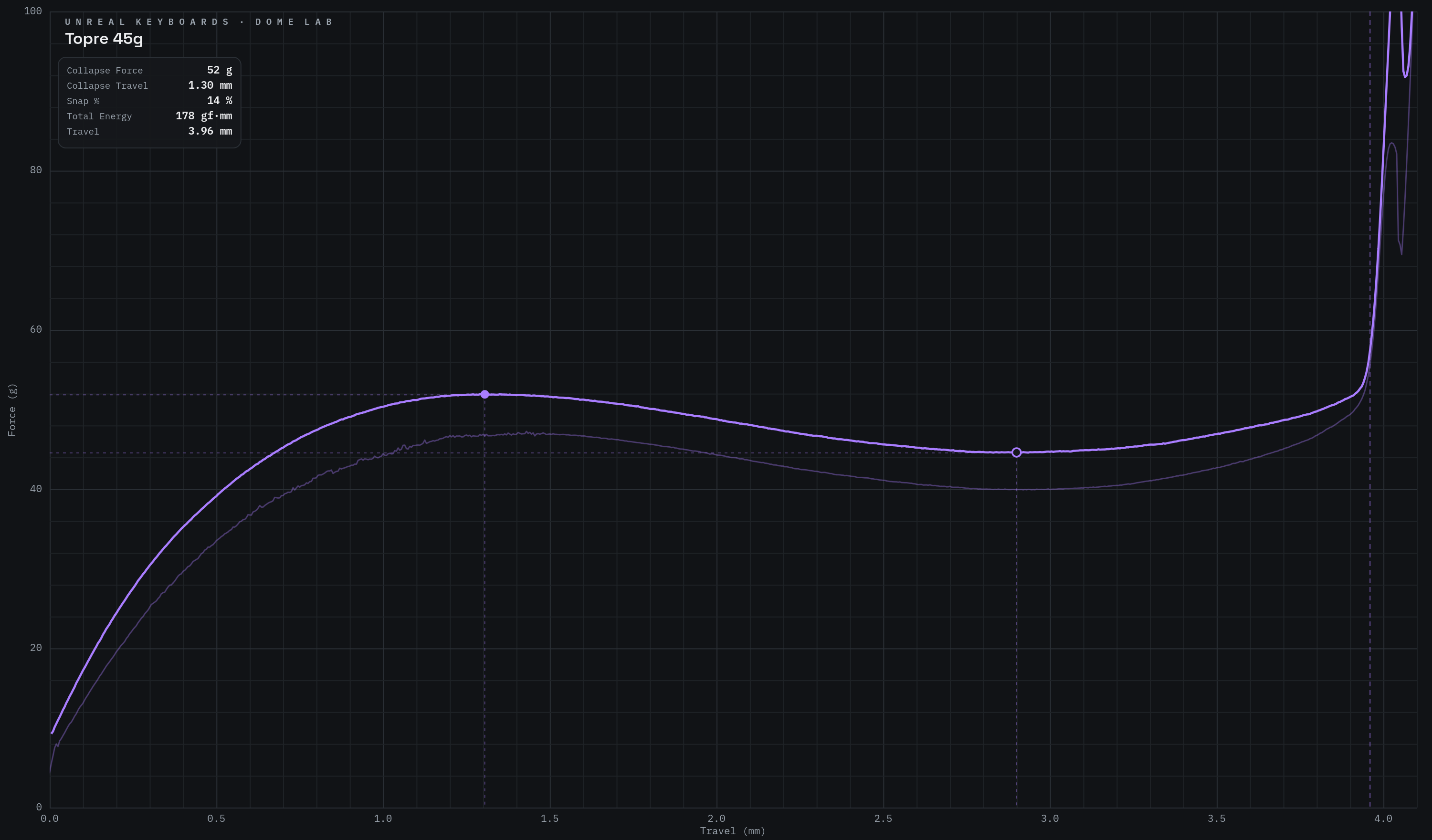
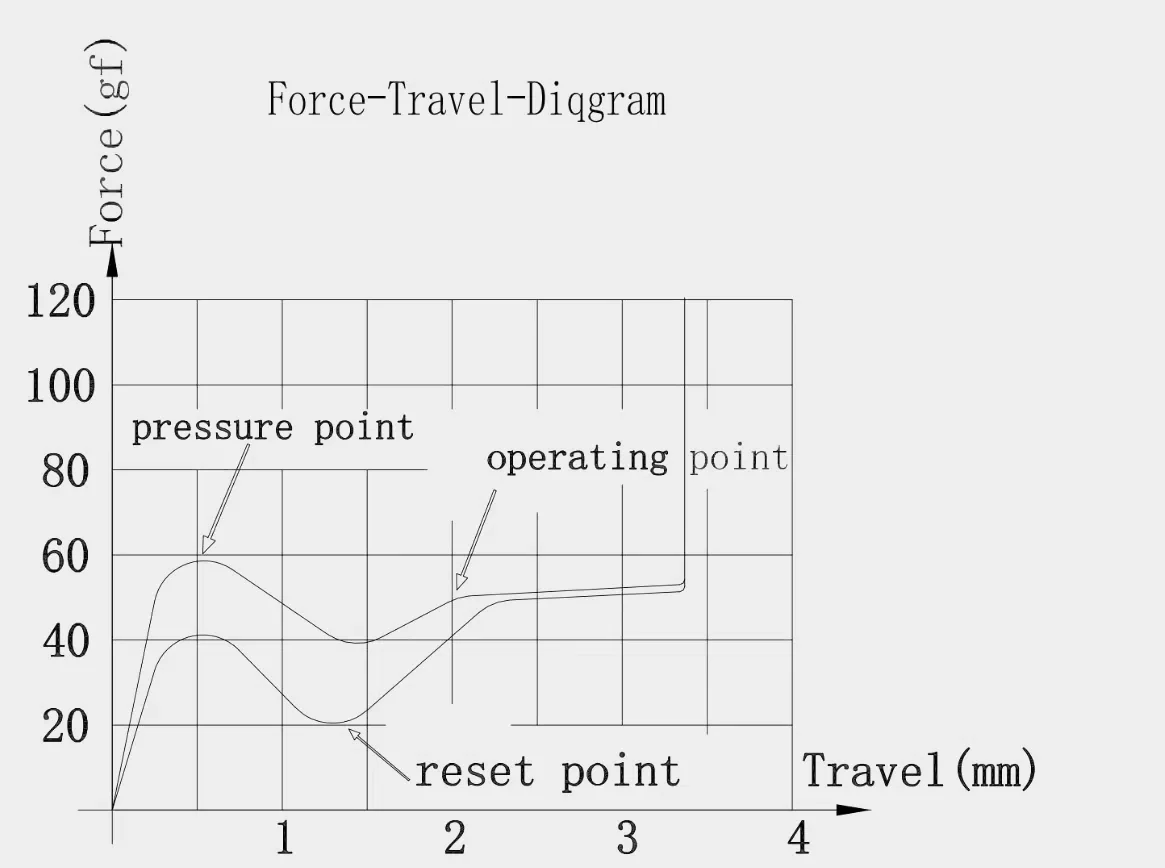
What this means in practice is that the topre switches have a much longer, smoother tactility as compared to the Bananas, which have a more abrupt, sharper tactility (although still far smoother than compared to, say, a buckling spring switch in the IBM model M and F keyboards, which have a very sharp tactile bump). So in practice it feels like the keychron switch has a bigger drop off when you're actuating the switch, where Topre feels more poppy, where the rubber domes smoothly collapse, then at the very hand bounce right back up very quickly. This feeling is largely impossible to replicate with a typical mechanical switch because of the limitation of springs versus rubber when it comes to rebounding from actuation. As such, this switch is probably about as close as you can get to the topre "bounce" while limited to a non-rubber dome switch.
The result of this lack of "bounce" whil having a considerable tactile bump is some degree of scratchiness in some of the switche son the board, especially the space bar, backspace, enter, and shift keys, which feel particularly scratchy on my board. Although they aren't nearly as scratchy as some other switches like MX browns, or even gateron browns, the scratchiness is still obvious when coming from topre, which because it is a rubber dome switch, does not have any means by which scratchiness could occur in the mechanism of the switch itself. See, Topre switches are capacitive rubber domes which actuate by the collapse of the rubber which presses a metal coil onto a PCB. This combination means that the switch is incredibly smooth and tactile while not having the scratchy feel of MX style tactile switches which involve plastic rubbing against plastic. Usually, this is improved by lubing a switch (which I do believe the super bananas come pre lubed), but there's only so much you can do to overcome a trait so fundamental to the way the switch operates. That being said, the switches are not nearly as scratchy as a lot of other MX style switches I've tried, and not nearly bad enough to make the board unusable. I honestly really like these switches, and recommend them for people who are fans of tactility in their switches, but not so much tactility that typing causes fatigue. Its also important to note that this keyboard has hotswappable switches, so if the switches weren't to your liking, you could always change them.
As I mentioned briefly, this keyboard has a fairly deep, thocky sound, but not nearly as compared to Topre, or some MX linears I've tried. This deep sound is paired with a some clack, which I like, but I know might be more controversial if you aren't a fan of clacky sounding keyboards. The keyboard is also fairly loud even with its dampining foam, considerably more than the HHKB, so if you planned on using it in an office, I'd consider something quieter if you want to keep your coworkers in neighboring cubicles happy. As I mostly work from home, this is not an issue for me, but for others it might be. Below is a sound test of the Keychron R3 as recorded from a blue snowball microphone, and next to it will be a recording of the HHKB through the same microphone.
As observed in this videos, the sound is similar, but less deep and resonating than the HHKB, and (although not obvious in the video), quite a bit louder). I personally prefer the sound of the HHKB, but I do enjoy the R3, as I think both have very satisfying and pleasant sound. I could listen to both for hours while typing and be very happy.
I am a big fan of this keyboard, and as far as MX-compatible boards go, this one is among my favorites. The switches in particular have impressed me quite a bit, as their tactility is much greater than I've come to expect from MX switches. The sound is also nice, although not as "thocky" as I would have preferred, it is still a very consistent, and enjoyable sound, with a bit of clack that I find particularly nice. Moreover, the build quality is fantastic, with great double shot PBT keycaps, and a very sturdy, and heavy plastic chasis, going so far as to be a considerable improvement over my favorite keyboard the HHKB professional classic. Ultimately, I do recommend this keyboard, and if everything I've described about it appeals to you as it has appealed to me, it gets a glowing recommendation. That being said, I do still prefer my HHKB, although not as much as I would have expected. I prefer Topre very slightly, and really only the layout is stopping me from totally switching to the R3 or a similar MX style tactile. If Keychron ever restocks their HHKB clone, I think I'd buy it up instantly, just to see if it really could replace my beloved HHKB. I also want to try the HHKB studio sometime, which actually ditched Topre for MX, and from what I've read, is remarkably similar to topre, despite being an MX linear switch from Kailh. Still, I am satisfied with this keyboard, and if I only had one keyboard for the rest of my life, I wouldn't be too terribly dissapointed if this was it, but I would be lying if I said I wouldn't miss my HHKB.
Quick edit: I keep saying 75% but its actually a TKL layout, which is like the 75% but with some extra keys above the arrow cluster, like home, insert, end, etc. layed out horizontally. A 75% is more compact (5% more compact in fact, a TKL is an 80% layout). I'm gonna leave in the original for a number of reasons, but most of all I'm lazy.
Back