Hey guys! I'm finally ready to review what has become my daily driver keyboard! It took a bit for me to arrive at this particular configuration, but now that I'm here, I'm largely satisfied with it! I went through a couple switches on my way to the Akkos, but now that I'm here, I don't have much interest in changing them for the time being! My reasoning behind that is a little more complicated than them just being a good switch (which they are), and I'll get into that in the switches portion of the review. First and foremost though, I want to cover the keyboard chassis itself, because that is the thing I have been most impressed with.
The Q2 body is made entirely out of machined, anodized aluminum, which creates an incredibly durable, heavy, and premium feeling body. I don't have a scale to measure the weight, but it is by far the heaviest keyboard that I have, and that includes Model Ms and other such tanks of machinery. The consequence is that the keyboard feels remarkably nice to use, with a smooth texture across the metal which I often catch myself just rubbing because of how soothing smooth, cold metal is to feel. For my build, I paired that with some generic blue keycaps with a smooth instead of rough texture that I got off amazon, and together that creates a beautiful, and incredibly satisfying user experience.
Its also important to note that the PCB is far more durable than a lot of the cheaper mechanical keyboards I've used in the past, which are vulnerable to having things like the hotswap sockets snap off if you're not super careful with them. Although I'm not saying you can go crazy with the PCB of the keychron, I haven't felt like I have to be particularly careful with it when swapping out my switches, which is something that I have had to be with some other keyboards. Taken together, the durable PCB and premium feel of the chassis itself makes this a perfect testbed keyboard for trying out new switches, and that's exactly what I've been doing with it. That is except for the sound, which a thick aluminum case with plenty of dampening foam is not suited for (although I will cover this in more detial in the sound section of this review).
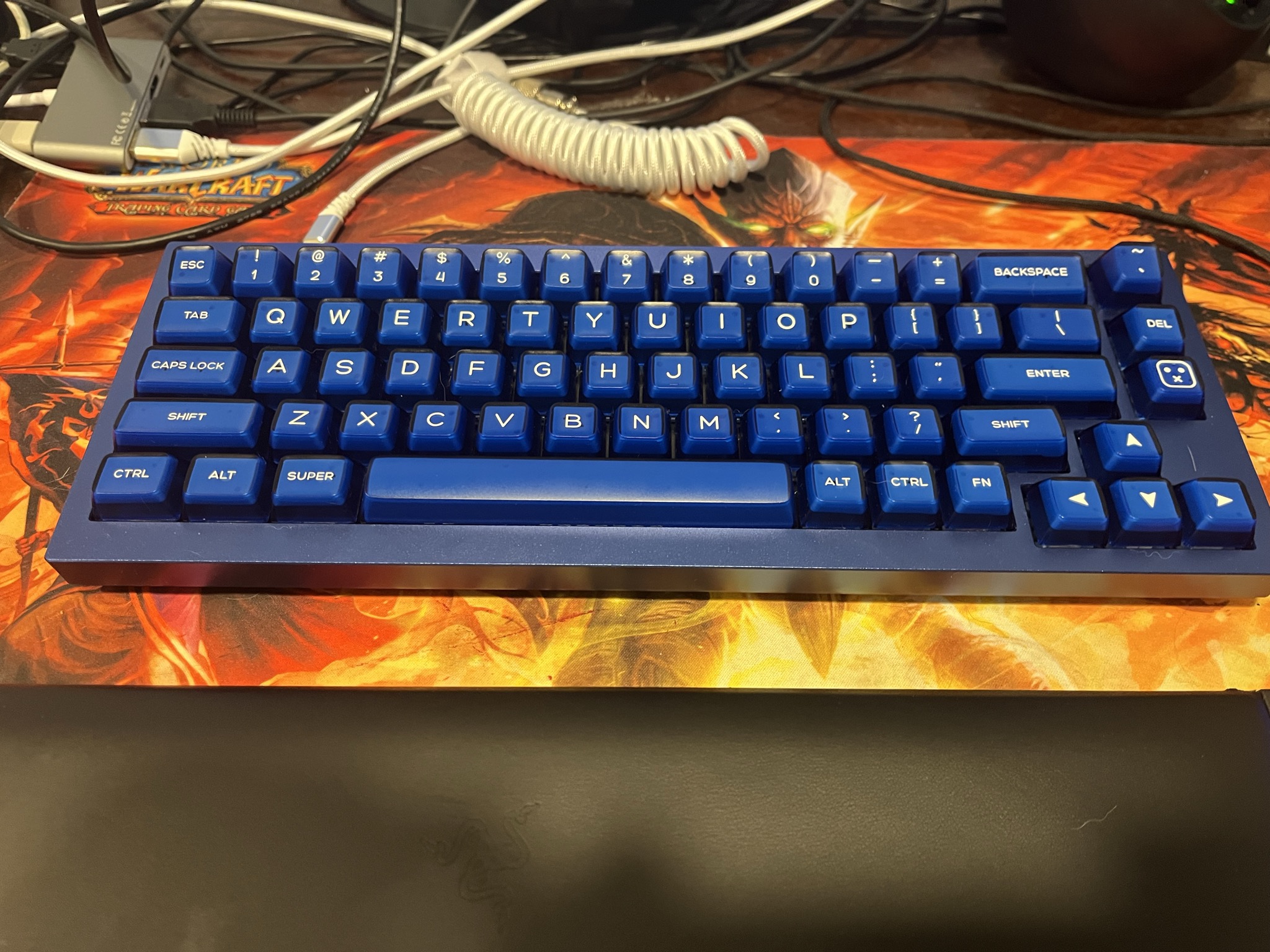
I went with the navy blue color when buying the barebones kit, and paired that with some blue keycaps since I figured they would look nice together, and I personally feel like I was right! Important note: I am partially colorblind, in that I have tritanomaly, which is partial blue-green colorblindness, so I am particularly a bad judge of blues and greens, so if the keyboard actually looks awful, sorry about that :/ . From my perspective, it looks great, and I hope that is the case for you guys! I also don't feel I should judge keychron too harshly here because a lot of the appearance is on the keycaps I personally chose, so if you don't like the look of the keyboard, know that you can and should swap out the keycaps for something new.
The Q2 is a 65% layout which I have mentioned in the past had not been sufficient for me without sufficient changes to the base 65% to allow for more comfortable access to the function layer (see my HHKB video). So, when I decided to try out a 65% again, I wanted to reprogram it to have a modified layout that more closely alligns with my preferences and needs, and in doing so, I arrived at the following:
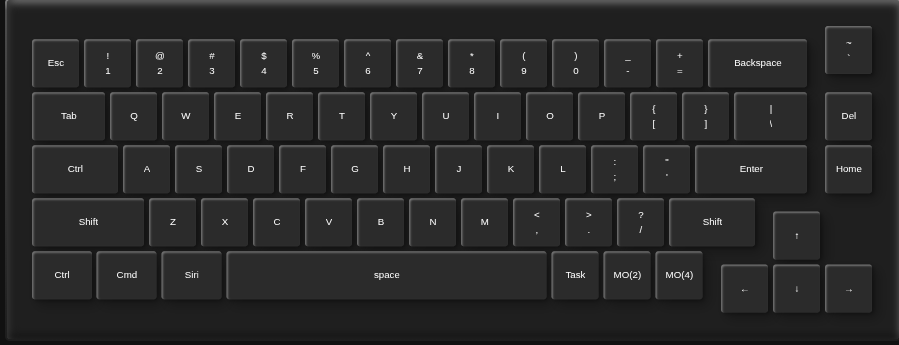
In summary, I placed a couple function layer keys in the bottom right for easy access, I made capslock control and kept a backup control in its usual position because I never need capslock, and some games get confused when you swap capslock and control, moved the super key right next to the spacebar so I can easily press it with the same finger as the spacebar (my thumb) without moving my hand in an uncomfortable position, and placed a tilde key in the top right corner where a knob generally is on this keyboard so I can locate it easily when playing an elder scrolls game (wherein the developer console is activated with a tilde key, and as anyone who has played an elder scrolls game, you regularly need to fix issues with the use of the developer console). Taken together, this layout has been nearly perfect for me. Not quite as convenient as the HHKB layout, as I like not needing to move my hands to access the arrow keys like I can with the HHKB, but it is as close as I've gotten with a traditional QWERTY layout thus far. The best compliment I can give the layout is that I haven't felt the need to grab my HHKB when doing things like coding the way I have with other keyboards I've tested for review. That being said, I definitely prefer the HHKB layout personally, as I like a smaller keyboard I can take with me that has the ability for me to just keep my hands on it rather than needing to move them around and reduce my efficiency. As someone who primarily navigates my OS with just a keyboard, I don't feel the need to use my mouse much at all save for within specific applications where non-keyboard exclusive input is required such as modern websites like youtube (which you can use with just a keyboard but it is not nearly as efficient as I wish it was.) In fact, I don't know if anyone noticed, but I specifically have designed my website to be very easily navigatable with just a keyboard! Give it a try after you read this review! Tab to navigate and enter to enter!
Switches are an area for this board which I had somewhat of an adventure with. The first switches I tried out where Kailh Box Royals, as I had heard good things from people such as Chryosran22 and Livakivi, as well as on forums, and wanted to try them out as someone who doesn't really care for linear switches and prefers tactile and clicky. My experience with them was immediately rough unfortuantely, as I found the switches to be incredibly scratchy, even though I specifically bought the V2s which were prelubed. Smoothness was something that I had taken for granted having used topre switches for so long, and switching to an MX style switch without sufficient lube to overcome the inherent scratchiness that comes from plastic rubbing on plastic was honestly unbearable. I loved how they sounded, and the level of tactility, but I couldn't use the switches for long before going right back to my HHKB in search of something smoother while still having some degree of tactility. For those that don't know, Topre switches differ from MX-style switches found in most mechanical keyboards because they use rubber domes for tactility rather than a plastic bump. This makes them somewhat similar to membrane keyboards, in that they both use rubber domes, but Topre is unique in the quality and tactility of the rubber used, making for an incredibly smooth, poppy, and rounded tactility that you can't quite emulate with an MX design. In fact, the MX design itself kind of sucks for tactility in a lot of ways (barring some key exceptions which I will cover very shortly), as the plastic bump used to generate tactility is incredibly harsh, scratchy, and not particularly tactile in most switches that use it (see Cherry MX Browns). What this means in practice is a lot of MX tactiles just feel like scratchy linears. This is not the case with box royals, which are explosively tactile, almost too tactile in fact, but with that tactility is an intense scratch that makes them impossible for me to use longterm.
After I decided to give up on box royals, I swapped the keychron super bananas out of my R3 keyboard I reviewed previously and put them in my Q2, and that was good as the switches were some of the best and smoothest MX-style tactiles I'd used before (with a rounded tactility that is fairly similar to topre actually), and I was happy with that for a bit, but I really wanted to try a switch that had been recommended all over the place in forums and in reviews for being a very good, affordable tactile, the Akko Creamy Blues. So, I bought them on Amazon on an impulse buy (as they were only 10 bucks for 45 switches), and after a day, they arrived at my door, and I was ready to test them!
And good god the reviews were right, these switches are fantastic! They are by far the closest a switch has gotten to topre I've felt, while actually beating topre in terms of tactility while not feeling scratchy. Because of this I actually prefer the feel of the Akkos to Topre, which I never thought I'd say, as they have the rounded tactility focused mostly on the top of the keystroke like topre, but without the slight mushy quality that comes with rubber domes, and with quite a bit more immediately felt tactility which makes the switch more satisfying comparatively speaking. Here are some force curves to hopefully show what I'm talking about:
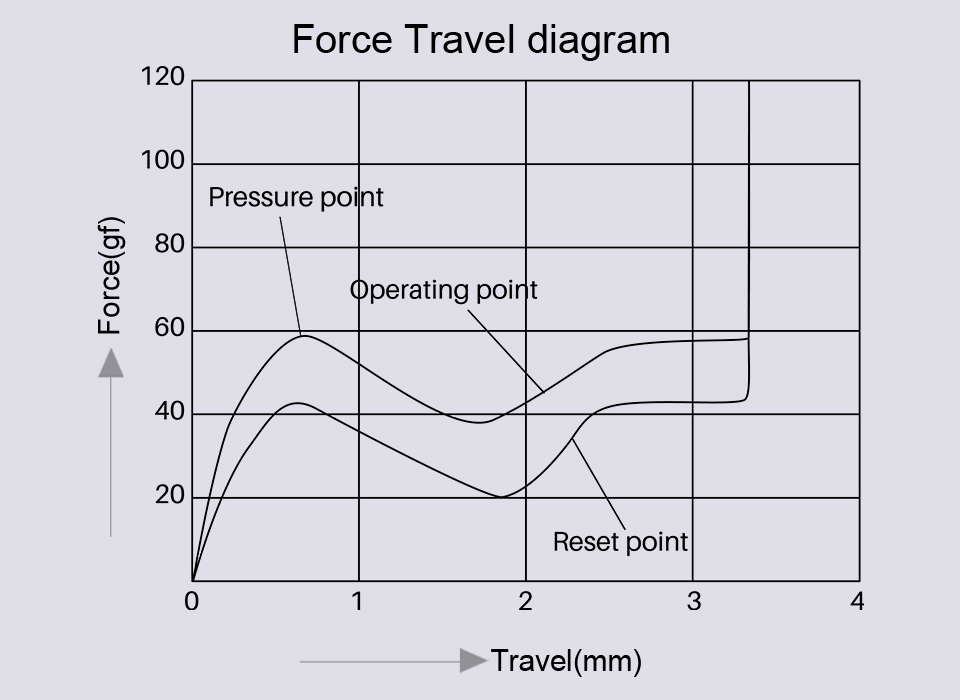
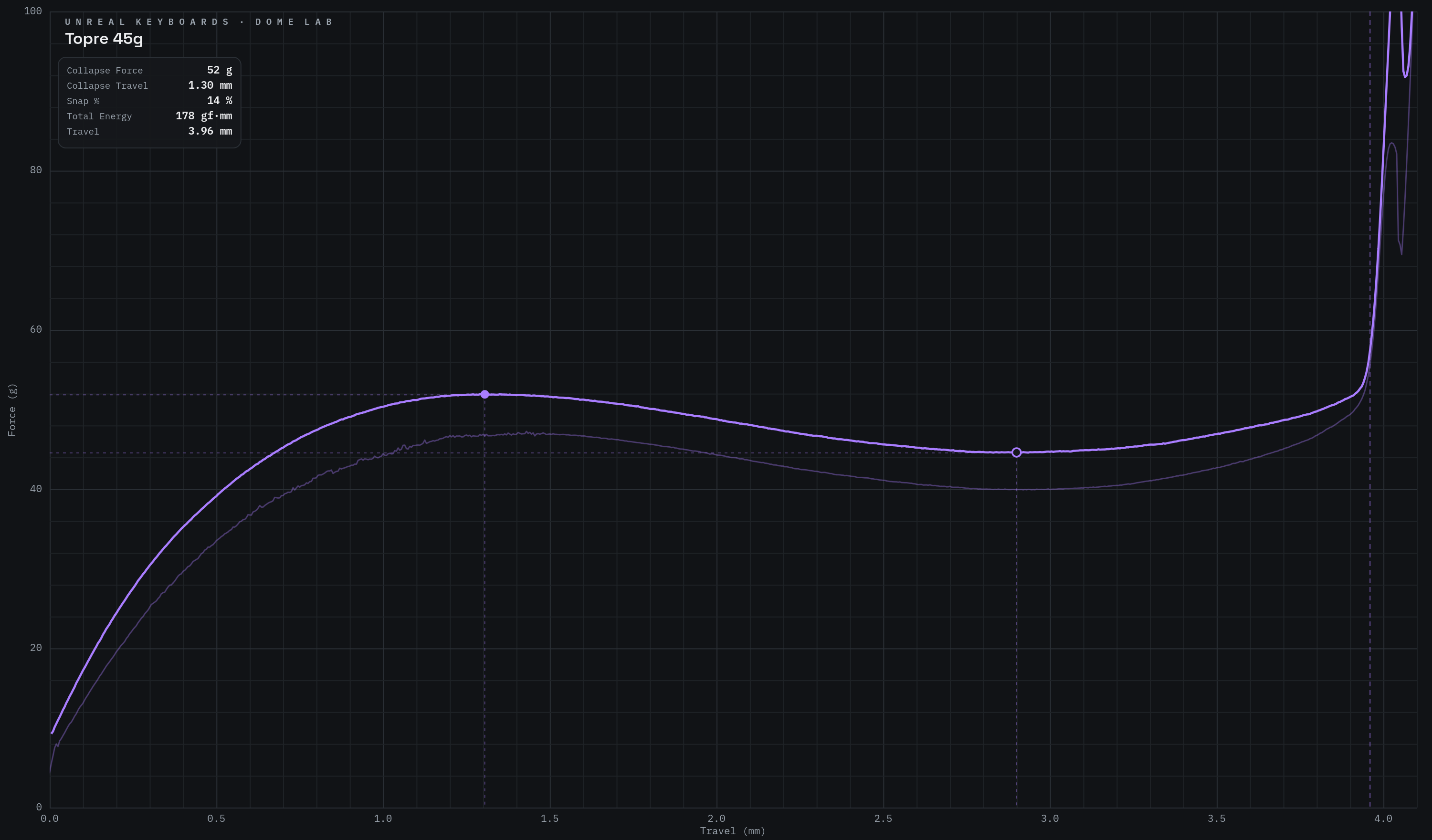
With the Tore switches, they start their actuation at 45 grams of force, and maintain this throughout actuation with a slight rounded wave of tactility. This results in a switch which is not that heavy to initially actuate, but requires a maintained force . The Akkos are also weighted at 45 grams, but require closer to 60 grams of force in the very top of the switch, before gradually collapsing into under 40 grams, before another gradual rice up back to 60. This creates a similarly rounded, but slightly deeper tactility which I find pleasant to use. This is paired with better smoothness than most linear switches I've felt that use an MX design, as the switch is aggressively lubed, resulting in a very smooth, rounded, but snappy tactility that gives me everything I love in a good mechanical switch. As an aside, I also consistently type faster than any other switch with the Akko creamy blues, although I'm not sure why. My usual average typing speed is around 136 WPM, but with the Akkos, I generally average at 148 WPM.
Sound is where this keyboard suffers the most unfortunately. Not to say it sounds bad, quite the contrary, it sounds very nice and clacky, with a little bit of creaminess in the middle of the keystroke. The problem is that the nature of an thick, dampened aluminum body is that sound is deafened rather than amplified. This differs from the HHKB or the Model M, which have hollow, plastic bodies which act similarly to an acoustic guitar by amplifying the sound, and creating a pleasant resonance. This makes the HHKB sound deep and "thocky", and the Model M to sound exceptionally, and sharply clicky, and in both instances, the sound is incredibly nice to listen to. The Q2, however, is relatively quite, and when in use, I rarely even notice the sound, which for most people is probably a positive, but for me who likes to hear my keyboards, is genuinely a negative. That being said, the larger keys like the spacebar have well-lubed stabilizers which prevents rattle, so the sound itself is very clean and enjoyable, if a bit quiet. That being said, I am willing to sacrifice the sound you get from a hollow plastic case in order to get build quality as good as this, so the point is relatively moot.
Below is a typing demonstration of the Keychron Q2 with the Akkos installed.
I love this keyboard. I may go as far as to say that its my favorite keyboard, although I'm not sure if I would feel that way if I switched back to the HHKB long enough to get used to its quirks. As it stands, however, I overwhelmingly recommend the Keychron Q2 body, as well as the Akko switches, although I unfortunately cannot recommend Kailh box royals, as much as I wanted to love them. Ultimately, buying the barebones Q2 at 50 dollars, and a couple orders of the Akkos for 20 dollars gets you just about the best keyboard you can for 70 dollars in my view (assuming you have some keycaps lying around, if you need to buy those also, add anywhere from 10-100 dollars depending on how nice you want you keycaps to be. I just bought some cheap 10 dollar keycaps off amazon and they are good enough for me). In the end I spent just over 80 dollars on the board, the Akkos, and the keycaps, which if you're used to just using whatever shitty e-waste keyboard that comes with a desktop bought from bestbuy, you may think is too expensive, but if you're someone who types a lot, either as a writer or a programmer or whatever, it is absolutely worth the investment, and this combination is just about the best value I've seen (in comparison, my HHKB cost over 200 dollars, which is overpriced, but it is a demonstration of how expensive a good keyboard can be). So, if you have the time, money, and inclination to get your first custom mechanical keyboard, the Q2 is just about the best option you have in my opinion.
Back